
How To Manage Applications And Tasks
Track application statuses, open endorsed projects, use task-platform links, and complete assigned work before its deadline.
Use My Applications to track each application and Tasks to open work assigned to projects that have accepted you.
Track Applications In My Applications
| Status | What it means |
|---|---|
| Applied | You have passed the eligibility check and successfully submitted your application. You can continue with the remaining steps. |
| Process Status | An in-progress status indicating you are at a step in the application process and have not yet completed all steps. |
| Screening | All application steps are complete and awaiting Recruiter review. Once approved, recruitment is complete and the PM will arrange Task work. |
| Endorsed | Your application has been approved and the project appears in your Tasks list. You can start accepting and completing tasks. |
| Rejected | Application not accepted, usually due to region mismatch, insufficient certification score, or full capacity. You may improve your qualifications and apply for other jobs. |
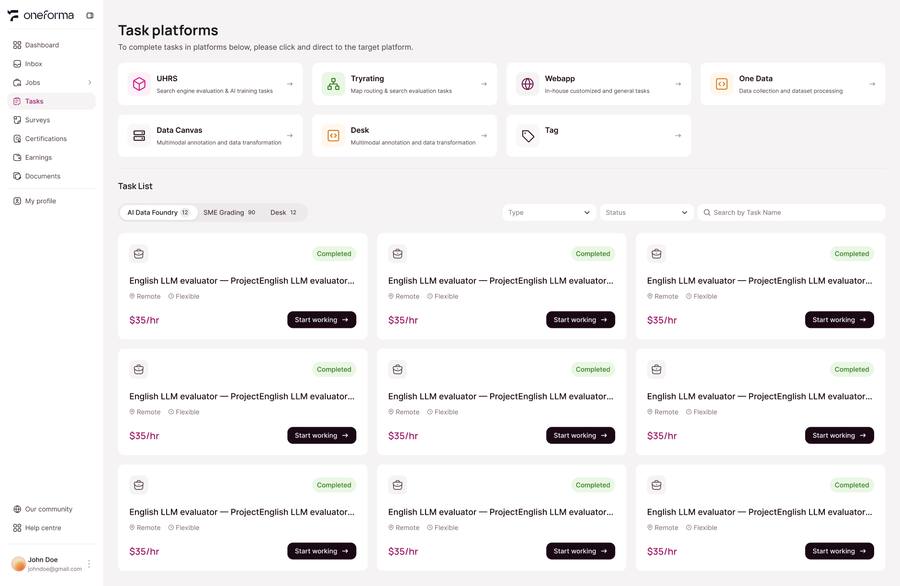
Use The Task Workspace
Task Queue
Each active project displays a list of assigned tasks pending completion, including task type (labeling, transcription, writing, scoring, etc.), estimated time, and unit price.
Work Platform Quick Access
The Tasks page provides quick access links to work platforms for each project. Click the link to go directly to the task platform without manually searching or entering any address.
Deadlines: Submit work before the deadline shown for the task. If you cannot complete a task, return it promptly when the platform provides that option.
Frequently Asked Questions
What happens if I don't submit a task before the deadline?
Tasks not submitted by the deadline may expire and be reassigned. Consistently missing deadlines may affect your task assignment priority. If you cannot complete a task, use "Return task" to return it promptly.