
How to manage your weekly availability on OneForma
Set your default weekly hours and adjust one specific future week from your OneForma profile.
Your weekly availability records the hours you prefer to make available for OneForma projects. Keep it current so project teams can understand your general capacity. Availability is a preference, and actual work can vary by project demand.
Open your availability settings
- Sign in to your OneForma account.
- Open My Profile.
- Select My availability.

Set your default weekly hours
- Select Edit default weekly hour.
- Enter your preferred weekly hours. The current field accepts 1 to 40 hours.
- Review the availability notice and select the acknowledgement.
- Select Save changes.

Adjust one future week
- Select the future week you want to change in the availability calendar.
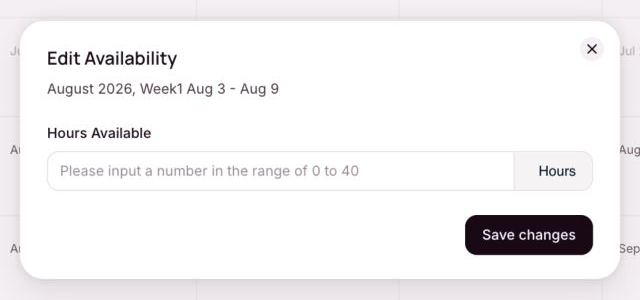
- Confirm the month, week number, and date range in Edit Availability.
- Enter the hours you prefer for that week. The current field accepts 0 to 40 hours.
- Select Save changes.
If your availability does not update
Refresh the page and confirm that you changed the intended week. If the saved value still does not appear, use the Help and Support form. Include the date range you tried to update, but never include your password or a one-time code.
Was this article helpful?
Let us know so we can improve our docs.