
How To Find And Apply For Jobs On OneForma
Browse matched jobs, use filters, complete eligibility checks, review requirements, sign agreements, and submit an application.
The Jobs area shows opportunities matched to your profile and lets you filter the list. Every job can have a different application flow, so review all requirements before you apply.
Browse And Filter Jobs
Understand Job Listings
Smart Matching
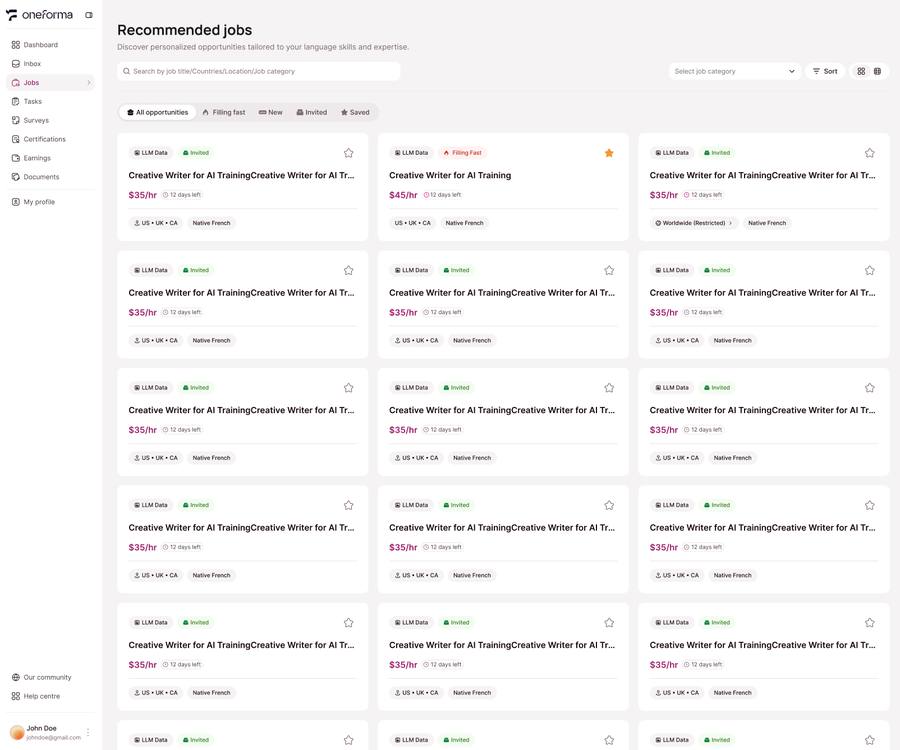
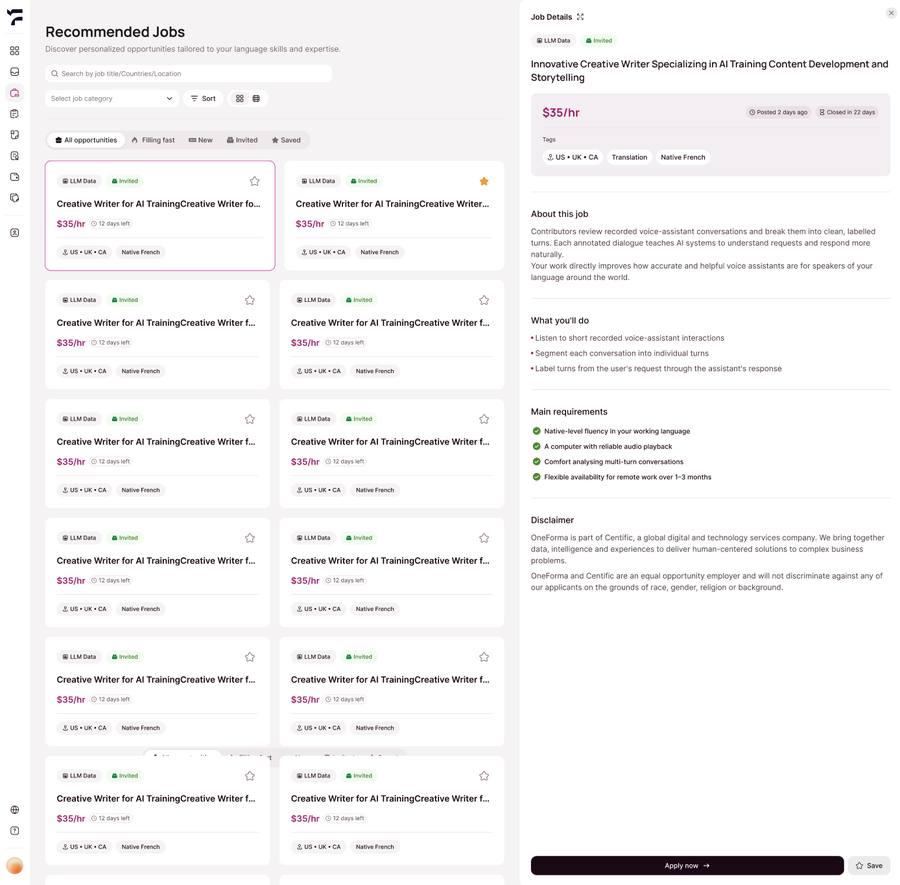
The system automatically matches and displays eligible jobs based on the personal information in your Profile (country or region, language skills, etc.). For translation projects, the platform further matches your translation language abilities. Please go to Profile → Languages to fully set up your Native Language, Spoken Language, and Translation Language Pair. The platform will use this to precisely match you with translation jobs that match your language abilities. The more complete and accurate your Profile information, the more precisely the system will match and recommend jobs. We recommend completing all Profile sections early for more high-quality job matches. You can click on a job card to view the full job description, task requirements, and pay rules. Once confirmed, click Apply Now to submit your application and start your crowdsourcing journey.
Multi-Dimensional Filtering
Supports combined filtering by job type, job title, region requirements (US, UK, or Canada, etc.), language requirements, and more to quickly find matching jobs.
Job Card Information
Each job card shows: job name, hourly or per-task rate, remaining application time (countdown), region requirements, required language skills, and Invited label (indicating a system-recommended match).
Save Jobs (☆ Star)
Click the ☆ icon in the top right of a job card to save it for later. Saved jobs can be viewed in a dedicated list.
Complete The Application Flow
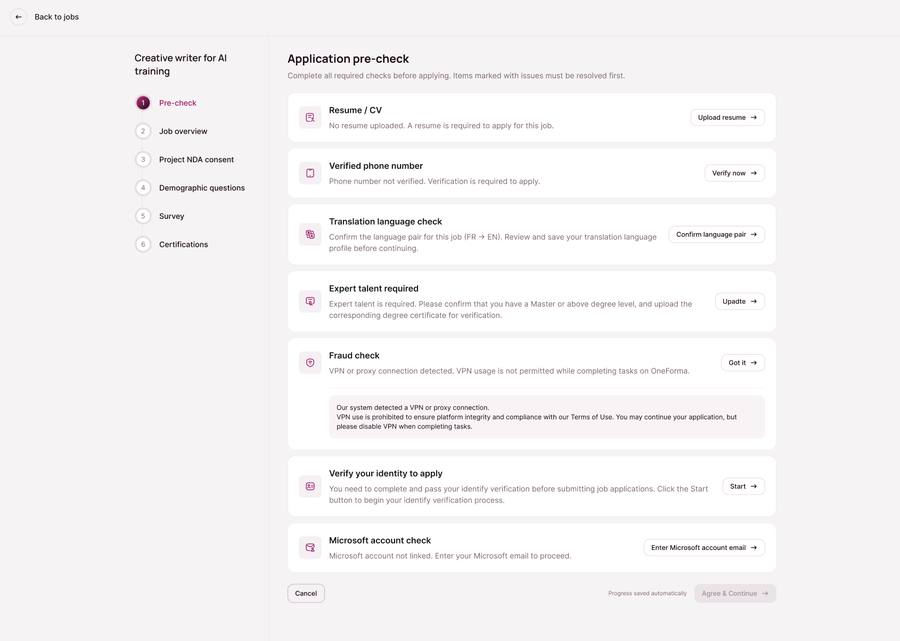
Fraud Check
The platform prohibits using VPNs or other proxy tools. If the Fraud Check detects abnormal network behavior, your account may be locked and you will need to contact Help Center to appeal. We recommend always accessing OneForma through a normal network.
Resume Upload
If a job requires a resume, you must complete the Resume Upload in your Profile in advance. Applications cannot proceed without an uploaded resume.
Phone Number Binding & Verification
If a job requires phone number verification, you must bind a phone number in your Profile and complete SMS verification. Incomplete binding or failed verification will block the application.
Identity Verification
If a job requires identity verification, you must complete the verification process (approximately 3 minutes). Failure will prevent you from applying for such jobs — please submit genuine and valid documents. In some cases, your verification may be in a pending review state and you will need to wait for approval before continuing the application.
Language Match
For translation jobs, if your Native Language and Spoken Language match the job requirements but you have not yet set up the corresponding Translation Language Pair in your Profile, the system will ask you to confirm and save that language pair before continuing.
Expert Talent Or Degree-Level Requirements
Some advanced jobs require Expert Talent qualification or a specific Degree Level. If a job has this requirement, the system will verify the relevant information in your Profile during Pre-check. Failure to meet the requirement will block the application. Please ensure your education and professional background information is accurately filled in your Profile, and that all information and certificates are genuine — falsified information may result in account suspension.
Microsoft Account (UHRS Jobs Only)
If you apply for a UHRS-related job, the system will require a valid Microsoft account email address, which must be @outlook.com or @hotmail.com domain. If you have already provided a valid Microsoft email in your Profile, this step will be skipped automatically.
Certification Check
The system verifies whether you meet the Certification requirements for the job. If any required certification test is marked as Failed on your account, you will be considered ineligible and the application will be automatically rejected. We recommend completing relevant certifications before applying and ensuring your scores are valid.
Finish Each Application Step
① Pre-Check
The system performs a multi-dimensional eligibility check to ensure applicants meet the basic requirements for the project. Different jobs have different verification requirements. See below for details:
② Job Overview
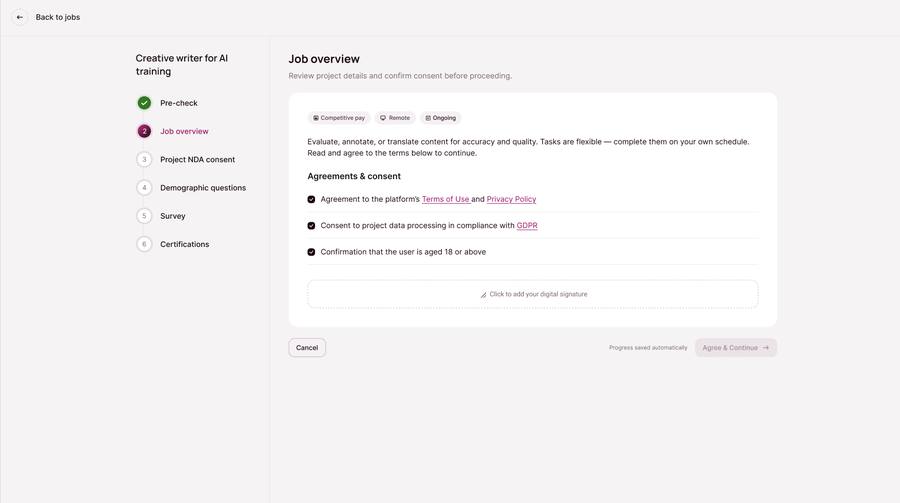
Read the full project description, specific task instructions, and participation requirements, then review and agree to the terms to continue. We recommend reading all details carefully to fully understand the project content and your obligations before proceeding.
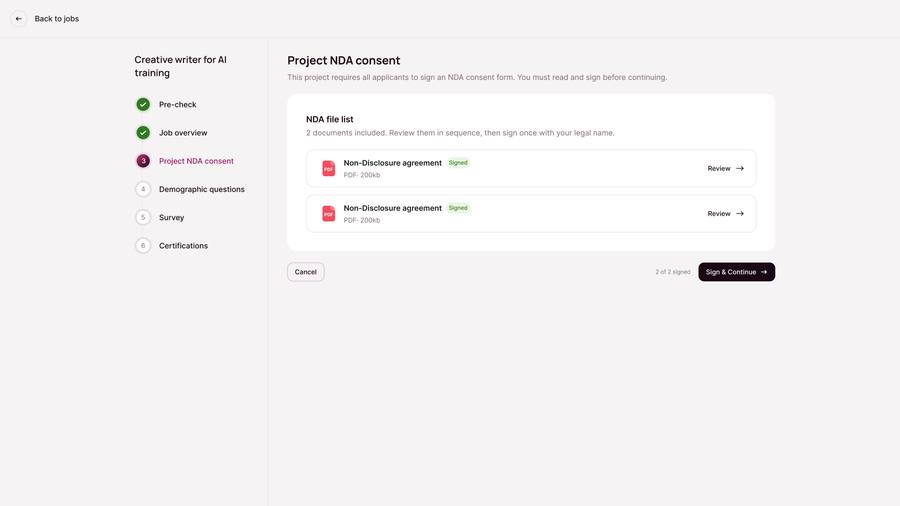
③ Project NDA Consent
Depending on project requirements, you need to read and sign relevant agreement documents using your legal name. Documents may include not only an NDA, but also PII agreements and other documents depending on the project. Please review and sign each one.
④ Demographic Questions Or Survey
Answer background questionnaires related to the project, covering areas such as professional background, age range, and device usage habits. Different projects have different requirements for applicant backgrounds — if your answers do not match the project's target audience criteria, the application will be rejected and you will not be able to re-apply for that job. Please answer truthfully.
⑤ Certifications
Complete the skill tests or qualification certifications required by the job. This step directly determines whether you enter the candidate pool — failing to meet the passing standard will prevent you from completing the application.
⑥ Under Review
After completing all application steps, the process varies depending on the job setup: · Recruiter Review Required: Your application enters a pending review state. Once approved by the Recruiter, recruitment for the job is complete and the PM will arrange specific Task work. · No Recruiter Review Required: Your application is automatically approved and you wait directly for the PM to assign project Tasks.
Before you apply: Do not use a VPN or proxy. Make sure your profile, required certifications, verified phone number, identity verification, and resume are ready when the job requires them.
Frequently Asked Questions
What does "Invited" on a job card mean?
It means the system proactively matched you to this job based on your Profile, skills, and certifications. Invited jobs generally have a higher acceptance rate — we recommend applying to them first.
Can I apply for multiple jobs at the same time?
Yes. As long as you meet the eligibility requirements for each job, you can apply for and participate in multiple projects simultaneously. Some projects may have exclusivity clauses — please check the job description.
Is signing the NDA required?
Yes. The NDA is a required document for project confidentiality and must be signed using your legal name to continue the application process.
Can I re-apply after rejection?
Rejection is usually due to region mismatch, insufficient certification score, or full capacity. We recommend improving your Profile and certification scores, then applying for other open jobs.
Does the eligibility check run every time I apply?
In most cases, once you have passed a verification item, you do not need to repeat it for subsequent job applications — items such as resume upload, identity verification, and phone verification retain their passed status. Note: identity verification expires after 18 months and must be renewed.