
How Payments Work On OneForma
Review earnings, invoices, disputed purchase orders, payment status, payout methods, cycles, and minimum payout rules.
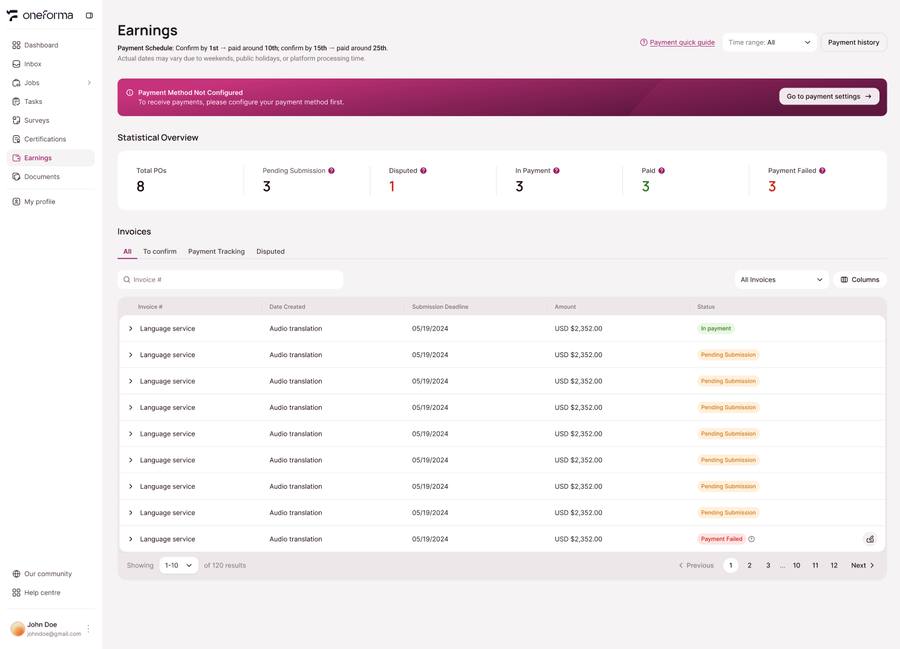
The Earnings page shows purchase-order and invoice information for your work. Before starting paid work, connect an available payout method and confirm that its status is Connected.
Use The Earnings Page
Payment Method
The top of the page shows your currently configured Payment Method information. Only a Connected payment method is effective — please ensure your account is properly connected before starting work.
Purchase-Order Overview
Shows a summary of PO (Purchase Order) data to help you quickly understand the overall payment status for the current cycle.
Invoices And Disputes
Shows your Invoice details and Disputed PO information. For disputed POs, you can view details here and contact the support team via the Help Center with the relevant task ID to file a dispute.
Connect A Payment Method
Supported Payment Methods
The platform supports the following payment methods depending on your region: · China users: Bank Transfer (only option); · Global users: Payoneer, PayPal, Tipalti. Please go to the Payment Method page in your Profile and select and configure the appropriate payment method for your region.
Connection Status
The Payment Method page shows the connection status of your payout account: Connected Connected means the account is linked and can receive payments. The Payment Method is only considered fully configured when showing as Connected, allowing earnings to be paid out normally.
Settlement Rules
| Rule | What to expect |
|---|---|
| Pay cycle | Weekly or bi-weekly, depending on the project. Check the job details. |
| Time to receive | Usually 2–3 business days after the pay cycle ends, when the payout method is Connected. |
| Minimum payout | Typically USD $10 or equivalent. Smaller balances roll into the next cycle. |
| Available methods | Bank transfer for users in China; Payoneer, PayPal, or Tipalti for global users, subject to availability. |
Payment status: A payout method must show Connected before OneForma can send settled earnings.
Frequently Asked Questions
When will I receive my pay?
Most projects use a bi-weekly settlement cycle. Payments arrive within 2–3 business days after the cycle ends to your linked payout account. Please confirm specific settlement times on the job details page.
What payment methods are supported?
China users: Bank Transfer; Global users: Payoneer, PayPal, Tipalti. Check and configure your available options at Profile → Payment Method.
What should I do if my earnings haven't arrived?
First confirm your payment account is fully configured and Connected, and that the pay cycle has ended. If the cycle has passed and everything looks correct but funds haven't arrived, submit a ticket via Help Center.
How do I handle a Disputed PO?
Open the disputed purchase order in the Invoice list and collect the relevant task ID and submission date. Send those details through the Help Center contact form so the support team can review the dispute.
Is there a minimum payout amount?
Typically $10 USD or equivalent. Balances below the minimum automatically roll over to the next pay cycle — no action needed.
Why must I complete Payment Method Connected configuration?
Only a Connected payment account is recognized by the platform as a valid payout account. Without a Connected configuration, earnings cannot be paid out even if settled — please complete setup before starting work.