
How To Review Invoices And Disputed Purchase Orders
Use the Earnings page to review invoice details, check purchase-order status, and send the information needed for a dispute.
The Earnings page contains your invoice list and disputed purchase-order information. Review the details there before contacting support.
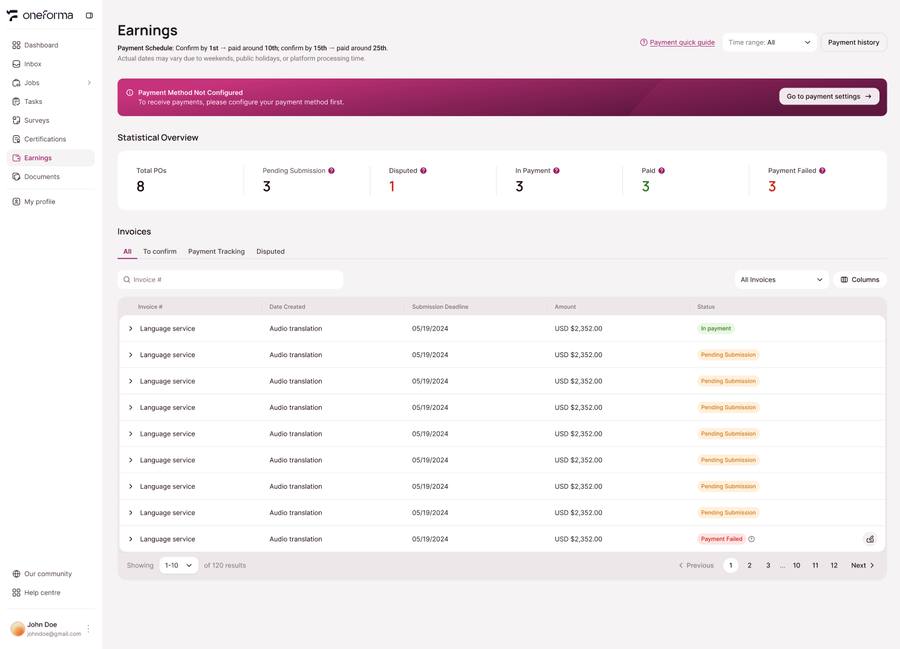
Review An Invoice
- Sign in to OneForma and open Earnings.
- Open the Invoice list.
- Check the project, task quantities, submission dates, and amounts.
- Review the displayed purchase-order and payment status.
Report A Disputed Purchase Order
Collect the relevant task ID, project name, submission date, invoice or purchase-order reference, disputed amount, and a short explanation of the problem.
Send those details through the Help Center contact form. Keep the information together so the support team can identify and review the correct record.
Minimum payout: The supplied platform guide lists a typical minimum payout of USD $10 or equivalent. Smaller balances roll into the next applicable cycle.
Was this article helpful?
Let us know so we can improve our docs.