
How To Set Up And Use A Passkey
Use your device security, such as Face ID, Touch ID, Windows Hello, or a PIN, to sign in without entering a password.
A passkey lets you sign in with the security already built into your device. You can add a passkey during sign-up, from Next Steps on your dashboard, or under Profile → Security & Privacy.
Start here: Open the official OneForma sign-in page.
Step 1: Choose Your Saved Passkey
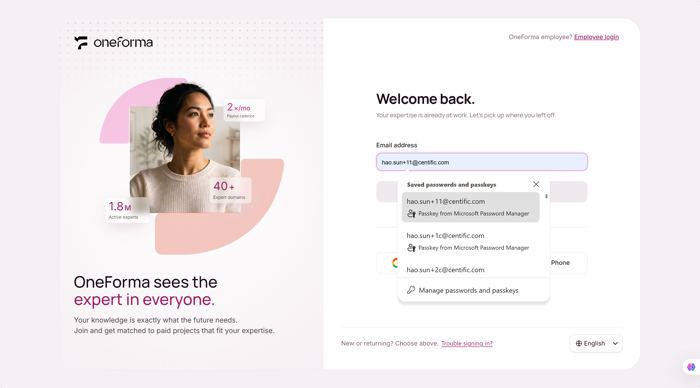
Open the OneForma login page and click into the email address field. If your device has a Passkey saved for an account, the browser shows a "Saved passwords and passkeys" dropdown with the matching account(s).
Step 2: Confirm Your Identity On Your Device
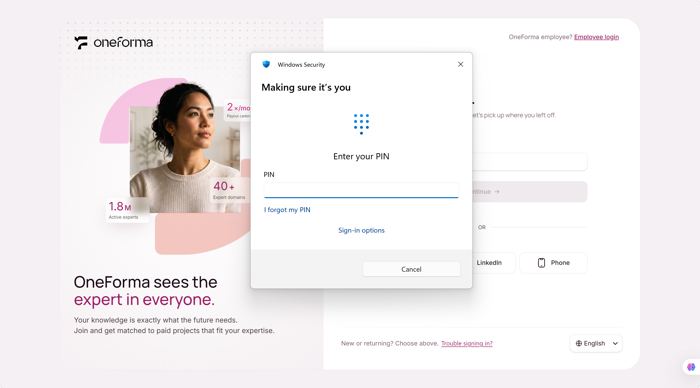
Click the account with the Passkey. Your device's security prompt (e.g. Windows Security, Face ID, or Touch ID) opens asking you to confirm it's you — enter your PIN or use biometrics to continue.
Step 3: Open Your Dashboard
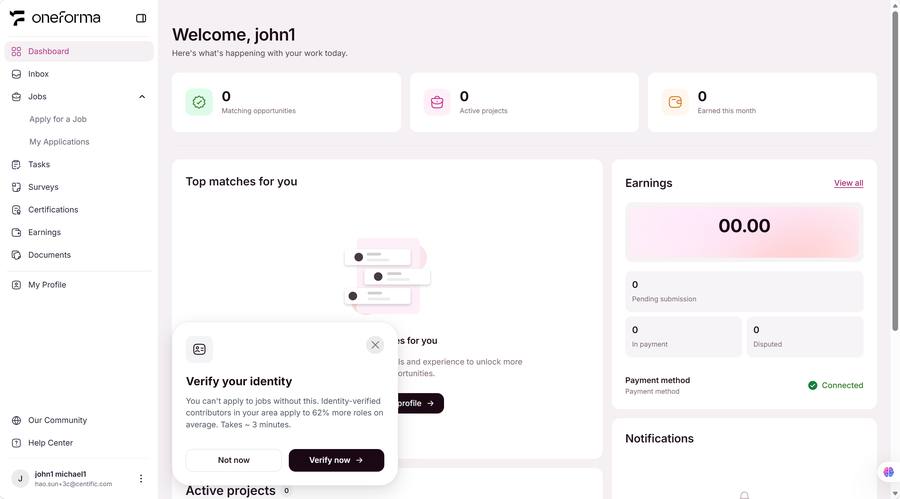
Once verification passes, the system confirms your identity and takes you straight to the Dashboard — no password needed.
Frequently Asked Questions
What is a Passkey?
A Passkey is a new type of authentication that uses your device's built-in biometrics (face, fingerprint) or key store — more secure and convenient than passwords.
How do I add my first Passkey?
There are several ways:1. You will be prompted to set up a Passkey after sign-up;2. After logging in, use the "set up Passkey" link in the Dashboard Next Step section;3. After logging in, go to Profile → Security → set up Passkey section.
Can I add Passkeys on multiple devices?
Yes. We recommend adding a Passkey on all frequently used devices so you can log in from any of them. Each device stores its Passkey independently.
Is my Passkey safe if I lose my device?
Very safe. Passkeys are stored inside the device and cannot be stolen remotely. If you lose a device, log in from another registered device and delete the lost device's Passkey.
How do I delete a registered Passkey?
Go to Profile → Security & Privacy → Passkey section, find the Passkey, and click "Delete". After deletion, that device must log in using another method.
Why can't I set up a Passkey on my device?
Passkey setup depends on your device — it must support Passkeys. If your device doesn't support them, you cannot set one up or log in with a Passkey.