
How To Delete Your OneForma Account
Submit an account-deletion request from Security & Privacy, understand the 30-day grace period, and cancel before deletion becomes permanent.
Account deletion permanently removes access to your OneForma account and related data after a 30-day grace period. Review pending work and payments before you submit the request.
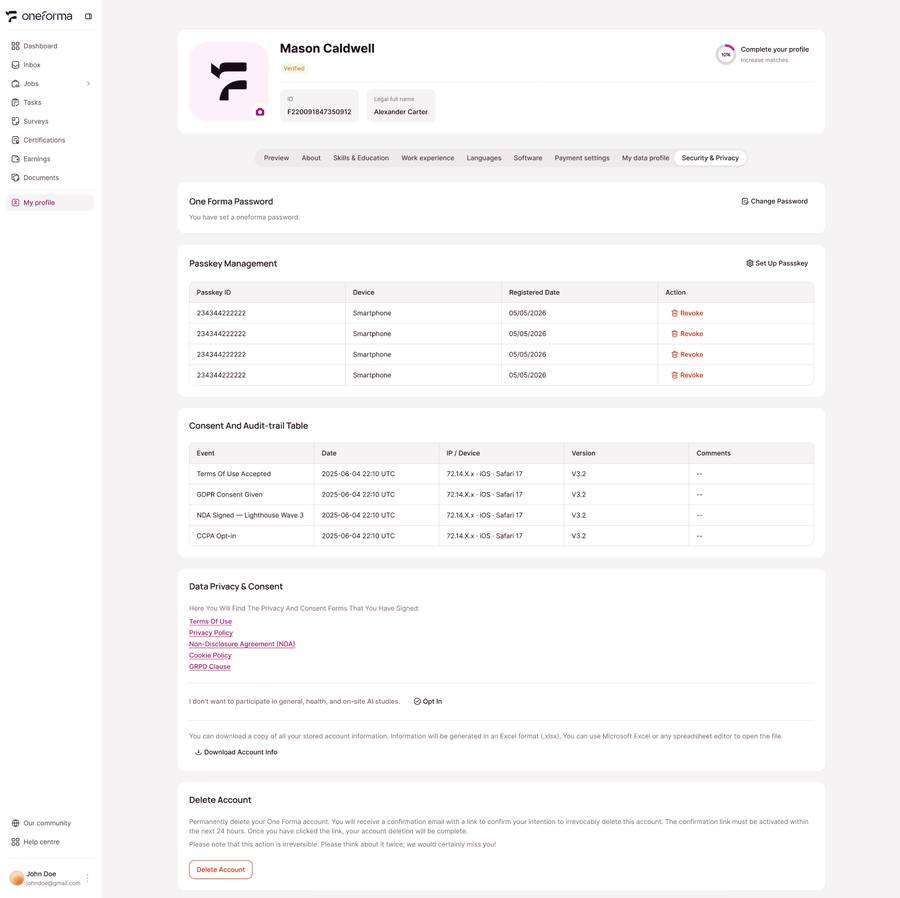
Submit A Deletion Request
- Sign in and open Profile.
- Open Security & Privacy.
- Select Delete Account.
- Review the notice and complete the confirmation steps shown by OneForma.
Use The 30-Day Grace Period
Submitting the request starts a 30-day grace period. You can cancel the deletion during this period. After 30 days, the account and its related data are permanently deleted and cannot be recovered.
Before You Delete
- Finish or return active tasks.
- Resolve pending invoices, disputes, or payments.
- Save any records you are permitted to retain.
- Make sure you understand that certifications and profile history will not carry to a future account.
If the deletion option is unavailable or you need help with a pending payment, contact OneForma support before submitting the request.
Was this article helpful?
Let us know so we can improve our docs.