
How to Delete Your Account
Table of Contents:
Deciding to delete your OneForma account is a significant step — and we’ll be sad to see you go. That said, we’re here to guide you through the account deletion process clearly and securely.
Step-by-Step: How to Delete Your Account
- Log in to OneForma and navigate to My Profile.
- Click Security and Privacy.
- Click Delete Your Account.
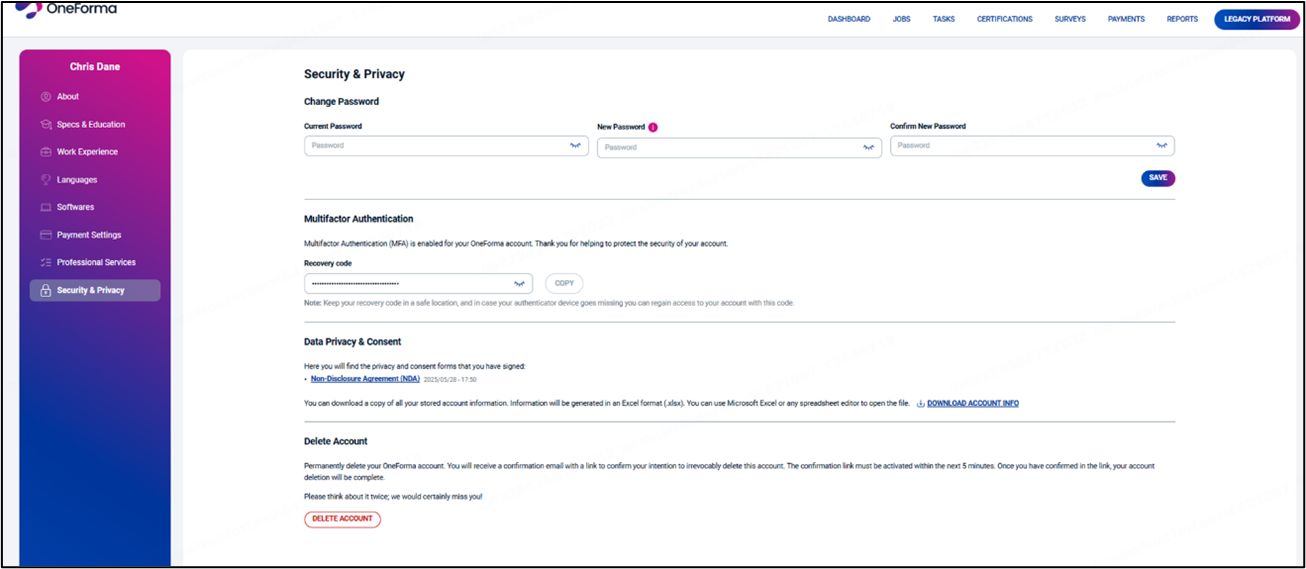
- Review the information shown in the pop-up window.
- Click Delete Account to initiate permanent deletion.
- Open your email and click Confirm to complete the process.
Important
When you initiate permanent account deletion, you will receive a confirmation email containing a secure link. This link must be activated within 5 minutes to complete the deletion process. Once confirmed, your OneForma account and all associated data will be permanently deleted.
Additional Considerations
Before proceeding, please review the following carefully:
- Data Removal: Account deletion is irreversible. All your data, including project history and payment information, will be permanently erased and cannot be recovered.
- Pending Transactions: To avoid complications, ensure all pending transactions or payments are completed or canceled before deleting your account.
- Reactivation: Once your account is deleted, it cannot be reactivated. If wish to use OneForma again in the future, you will need to create an entirely new account.
Please Note: If you re-register after deleting your account, you cannot use the same email address that was previously associated with the deleted account.
Device Requirement for Account Deletion
Account deletion cannot be performed on mobile or tablet devices. You must log in from a computer (desktop or laptop) to initiate and complete the account deletion process.
Need More Help?
OneForma Support is here to help! If this article hasn’t given you the answers you’re looking for, try reaching out to us here. We’ll get back to you as soon as possible.